
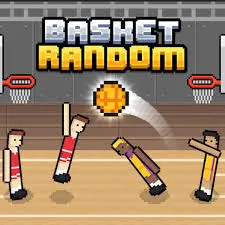
 Basket Random
Basket Random looks like a joke: two wobbly pixel players, a hoop, and a ball that never behaves the same way twice. Then you try to score and your player cartwheels into the corner. That mix of dead-simple rules and unruly physics is why people keep tapping “one more match.”
This guide covers what you actually need: how a match works, the controls on keyboard and phone, what the random changes mean for your shots, strategy for solo and two-player games, safer ways to play, and what to do when the game stutters.
Detail | What to know |
|---|---|
Type | Two-player arcade basketball with ragdoll physics and pixel-art graphics |
Modes | Solo against the CPU, or two players on one device |
Developer | RHM Interactive, the studio behind TwoPlayerGames |
Controls | One input: W, Up Arrow, or left-click on desktop; tap on mobile |
Winning | The App Store description says the first side to 5 points wins |
Online play | The publisher’s page said online play wasn’t available when we checked in October 2026 |
Same series | Soccer Random, Volley Random, Boxing Random |
Price | Free in the browser; listed as free in the App Store |
“Unblocked” usually means a version of a game that loads on networks where many gaming sites are filtered, such as school Wi-Fi or an office network. It isn’t a different game. Basket Random runs in the browser, and the developer also lists it on the App Store and Google Play, so there is more than one way to reach it.
A block on a school or workplace network is usually a deliberate policy, so this guide won’t help you work around one. Play at home or anywhere gaming is allowed, and if you think a block is a mistake, ask whoever manages the network.
Copies of popular browser games pop up everywhere, and quality varies. Be wary when you see:
When in doubt, use the publisher’s site or a major game portal.
Pick solo against the CPU or two players on one device. Each side fields two ragdoll players, and a single input controls them for your team. The publisher calls this its 2v2 format. You score by getting the ball through the other side’s hoop, and the App Store description says the first side to 5 points wins (match settings could differ by version).
The twist is that the game reshuffles after each basket. Players, ball, and court can all change, so you’re constantly adapting rather than repeating one shot.
The publisher lists three equivalent inputs: W, the Up Arrow, or a left mouse click. One input handles everything:
The screen is split down the middle. Tap your own half to control your team, so the left side belongs to the left team and the right side to the right team.
On a phone or tablet, each person taps their own half. On desktop, check the on-screen prompts in the version you’re playing to see how the two players split the available keys.
After each score, four things can change: who is on court, which ball is in play, where you’re playing, and how the hoops are shaped.
Ball | How it behaves | How to adjust (our suggestion) |
|---|---|---|
Classic | A standard basketball | Use it to learn your baseline release timing |
Heavy | Doesn’t bounce when it lands and travels slowly when thrown | Release earlier than usual and expect a slower flight. A miss won’t bounce back into play |
Light | Very bouncy and quick | Use gentler releases and stay ready for wild rebounds |
Colorful | Worth +2 points | Treat it as the priority of the round and contest it hard |
The publisher lists four physical variations: long-armed, short-armed, small-headed, and large-headed players. They change how the game plays, so spend your first second sizing up both sides instead of charging in.
Courts include a city street, a beach, a gym, and a snowy field. Snow is more slippery, so movement takes more care. Hoops can also be tall or short, and nets wide or narrow, which changes how forgiving a shot is.
Shooting. Hold to keep the ball and release to throw it. Judge the distance, the angle, and where your opponent is before you let go. A feint, where you hold and then wait, can bait a defender into jumping early.
Defending. Hold to jump with your arm raised and block. If you read the shot early and jump ahead of it, you can block and sometimes catch the ball in the air. Keep your two players spread out rather than bunched together, so one is usually between the opponent and your hoop.
Solo against the CPU. Use these matches to learn the physics. Practice your release timing on different courts and with different balls before you play friends.
Two players. Randomness keeps matches close, so patience beats panic. If your version plays to 5, one +2 basket can swing the score, so the colorful ball is worth fighting for.
The 2v2 format. Because one input drives both of your players, you can’t micro-manage them. Aim for a rough split: one near the hoop and one farther back.
The publisher warns that outdated copies can run too slow or too fast, so start by switching to the official version. Then try these:
If you like the formula, the same studio makes Soccer Random, Volley Random, and Boxing Random, each with the same unpredictable physics. For more basketball, points to Basketball Stars, a one-on-one game with a more competitive feel, and Basket Bros, a faster arcade-style game.
Basket Random works because the rules take ten seconds to learn and the physics never settle. Learn the hold-and-release rhythm, check the ball and the court at the start of each round, grab the colorful ball when it appears, and play it on a trustworthy site or the official app.
Yes. It’s free in the browser, and the App Store lists the app as free. Ad and data practices vary by platform, so check the privacy section of the listing you use.
It usually means a version of a game that loads on networks that filter many gaming sites. It’s the same game, reachable in more places.
Only if your school’s rules allow it. If a site is blocked on school Wi-Fi, that is usually intentional, so ask a teacher or administrator rather than trying to get around it.
Use one input to move, jump, block, and shoot. Hold to keep the ball in hand and release to throw it at the hoop. Score on the other side’s basket to win points.
On desktop, use W, the Up Arrow, or a left mouse click. On a phone or tablet, tap your half of the screen.











